|
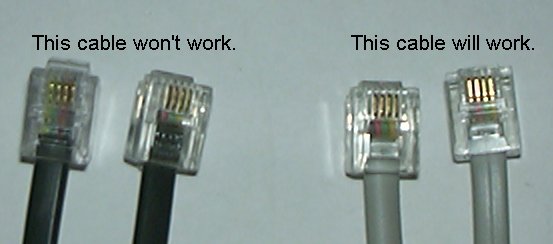
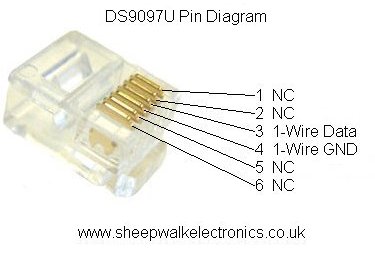
Cable Type: Whilst you can use just about any two core cable for small 1-Wire networks, it is usually better to use a twisted pair cable, the most commonly available being Cat5 Ethernet cable. Connectors: All of our modules (as well as many from other manufacturers) use RJ45 sockets wired to a standard layout that allows you to use cheap and readily available Cat5 Ethernet cables to join modules together to build your network. The exception to this is that the bus master modules we sell (the DS9097U and DS9490R) have RJ12 connectors and not RJ45. So the first cable on your network will need to have an RJ11 or RJ12 connector on it. The First Cable: You can often manage with an old modem or telephone cable if you have one lying around as the RJ45 sockets on the modules will take an RJ11 plug. If you want to do this you need to ensure that the pins are connected the right way round as many modem cables reverse the order of the cables from one end to the other. You need a cable with the middle two pins connected straight through to the same pins on the other cable. See this image for examples of cables that will and will not work. As you can hopefully see on the image the colours need to be in the same order on both ends of the cable. If you don't have a suitable cable, we sell ready made cables which you can find on the Cables and Connectors Page of our online store. Connector Pinouts: If you wish to make your own modules or cables here are the pinouts to help you: RJ45 connector on the modules RJ12 pinout on the DS9097U Host Adapter RJ12 pinout on the DS9490RU Host Adapter |